Typeform Tips & Tricks - Partial Submit Point
|
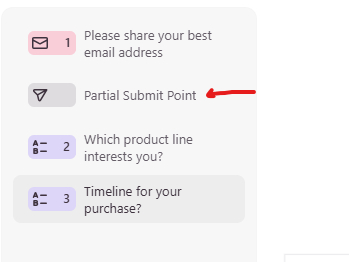
Two weeks in a row! I'm on a hot streak! Lead Capture and Partial Submit Point - is there a simple way to implement the feature? There has always been a debate about when to ask for an email address in a form/quiz. Some experts believe that you need to ask later in the form, when you are entitled to ask the user to share the email. They suggest that AFTER you provide some value to the user, then you can ask them for their email. This is really well suited for cold outreach. If you are sending people to a form from your web/sales page, where the user is seeking more information from you, then by all means, ask for the email up front. But insert a “partial submit point” in your typeform to be sure that you get the email address - even if they don’t complete and submit the entire form. You can then use a nurture sequence to foster the user into completing the form.
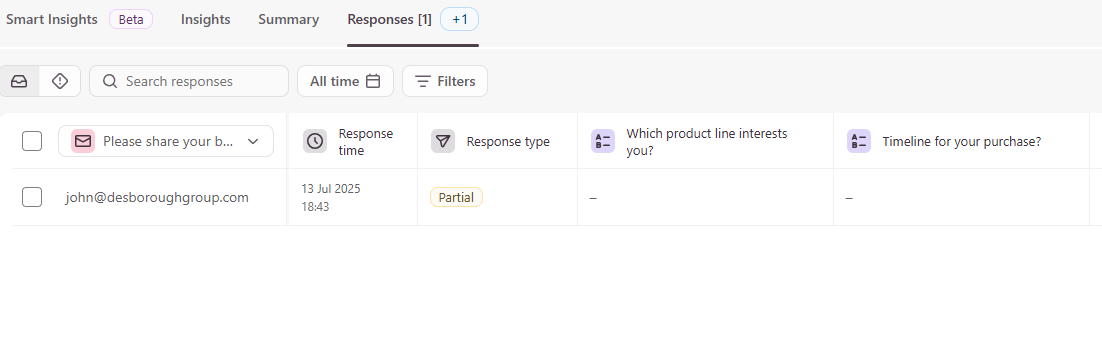
When the user starts the form and completes the email question (my first question), the email is already captured in the Results - Responses table:
Note that it says “Partial” in the Response type field. Also note that if you Connect a Google Sheet to the typeform, the partial response will also be captured.
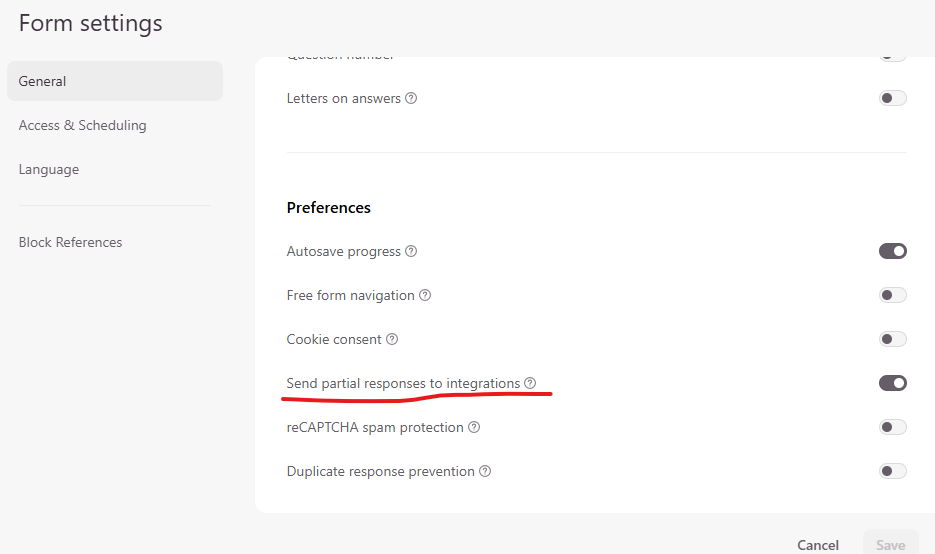
You will need to make sure that you have toggled on the required setting for the partial submits to connect to integrations.
Once the user completes the form, the Responses - Results tab shows the Response type as ‘Completed’ and the answers selected and submitted by the user.
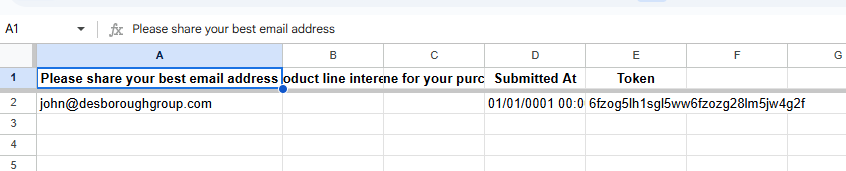
In the Google Sheet for this example, there is an entry for the completed record as well as the partial submit.
One thing that I would call out here, and needs some further research with Typeform Support, is the ‘duplication’ of the entries into the Google Sheet. For the email used in this example, the Token values for the two rows of the partial and complete submission are identical. Note the Submitted At values: the completed submission has a valid current date while the partial submit has a date value of “01/01/0001”. This is easy enough to filter out for reporting BUT in the Google Sheet, it doesn’t tell you WHEN the partial submit actually happened. You have to go back to the Results - Responses (at this point) to get the correct date/time details for the partial submit if someone does NOT complete the form. Note that in the image we showed earlier, the Response time field does have the correct date and time.
So my word of caution/advice, at this point, if you are using the Google Sheet integration to capture the partial and fully complete you need to cross-check what seem to be partial submits with the Results - Responses table. That will ensure that you have the actual capture date of the partial submit. Hope that helps a bit. Cheers des |


john desborough
Email List Profit Extractor and Typeform Tips & Techniques
Contacts and Automations are now available in Typeform! Instead of pushing all your contact details into a Google Sheet or CRM, you can now track and leverage Contacts in Typeform. AND a new add-on - Automations - is going to be a real boon for SMBs: you can now create automations directly in Typeform. Think about someone filling in one form and you sending them a follow-up form to complete and reminder emails based solely on Typeform, that's what is now available. You can learn more about...
Typeform is a really great tool to help identify the buyers in your mailing list AND find out exactly what content/products they want to buy. Don’t want to read any more? Here’s a link to the sample typeform I’m talking about Feel like you are wasting time and energy creating content for people who don’t buy? How do you identify real buyers in your list? How do you create content/products specifically for them? The 30 Second Survey. (spoiler alert - it’s the typeform) The goal is to identify...
Here’s a little example of a style of ‘Audio Response’ typeform that I recently built out for a corporate cafeteria. They wanted a really simple form that users could access internally and submit comments about the lunch in the cafeteria. They didn’t want to use the video feature to allow staff to be relatively anonymous in their entries. They opted for the Audio option to be able to not only get the users to leave their verbal comments but also for the transcription that is available. Here’s...