Typeform Tips & Tricks - the Summer Solstice Edition.. sort of
|
Sorry I've been out of your inbox. Life. A whole bunch of Typeform projects and some other work has made it almost impossible to stay awake long enough to put something out each week. And to try and make up for that, since my birthday just passed last week, I have made a commitment to me - and hence along to you - that I will work to be more diligent and send these out more frequently. Here's the quick scoop for this edition: how to keep track of 'which form' was completed by the user. I have a bunch of typeforms that push data into a single Google Sheet. I consolidate the details into a master tab. Each form contains a set of similar data but to make it easier to identify where the user record comes from, i use a custom variable To keep track of the form in the responses, I create the custom variable v_form_name in each form and give it the name of the form - like in the image below:
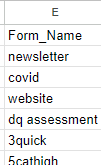
that variable data is submitted along with the responses to the Google Sheet. Now, when i consolidate the records from the various input forms into a ‘master tab’ - using email address as the unique identifier/key field to connect all the inputs - i have a column that gives me the names of the forms that have been used to submit the data record.
I can filter on that field and figure out how many folks completed the ‘newsletter’ form in this example. That’s my little hack for today.. hope it might come in handy for some of you.. cheers I'll also post this over on the website des |

john desborough
Email List Profit Extractor and Typeform Tips & Techniques
Contacts and Automations are now available in Typeform! Instead of pushing all your contact details into a Google Sheet or CRM, you can now track and leverage Contacts in Typeform. AND a new add-on - Automations - is going to be a real boon for SMBs: you can now create automations directly in Typeform. Think about someone filling in one form and you sending them a follow-up form to complete and reminder emails based solely on Typeform, that's what is now available. You can learn more about...
Typeform is a really great tool to help identify the buyers in your mailing list AND find out exactly what content/products they want to buy. Don’t want to read any more? Here’s a link to the sample typeform I’m talking about Feel like you are wasting time and energy creating content for people who don’t buy? How do you identify real buyers in your list? How do you create content/products specifically for them? The 30 Second Survey. (spoiler alert - it’s the typeform) The goal is to identify...
Here’s a little example of a style of ‘Audio Response’ typeform that I recently built out for a corporate cafeteria. They wanted a really simple form that users could access internally and submit comments about the lunch in the cafeteria. They didn’t want to use the video feature to allow staff to be relatively anonymous in their entries. They opted for the Audio option to be able to not only get the users to leave their verbal comments but also for the transcription that is available. Here’s...